
PvZ Sex Lawn not loading or freezing?
By pvzsexlawn.app ·
Start with the last thing you could see. A cover with a Start button, a player still fetching files and a level that has stopped moving each call for a different fix.
The cover stays on screen
On the browser player, select I’m 18+ · Start demo. The site waits for that button before it requests the game. The fullscreen button can enlarge the cover while the game is still closed. If the page tells you to enable JavaScript, enable it for the site and reload before pressing Start.
The game opens, but the first load stalls
Keep the tab online and in the foreground. The two large files in this build are the engine (39,514,754 bytes) and the game pack (39,080,768 bytes). Together they are about 79 MB before compression. A fresh browser may need to fetch both. The amount transferred and the wait depend on your connection and cache.
If the connection dropped, restore it first, then reload once and press Start again. When the title screen appears, the download stage is over. Select the Start button inside the game to open the level menu.
The player shows a WebGL 2 error or a black screen
Look for “WebGL2 - Check web browser configuration and hardware support”. We saw this exact message on the live player when WebGL was unavailable in desktop Chrome. With WebGL 2 available, the same build fetched both game files and finished starting. If you see that message, try a current browser with WebGL 2 support on the same device. Waiting for a larger download will not resolve a missing graphics feature.
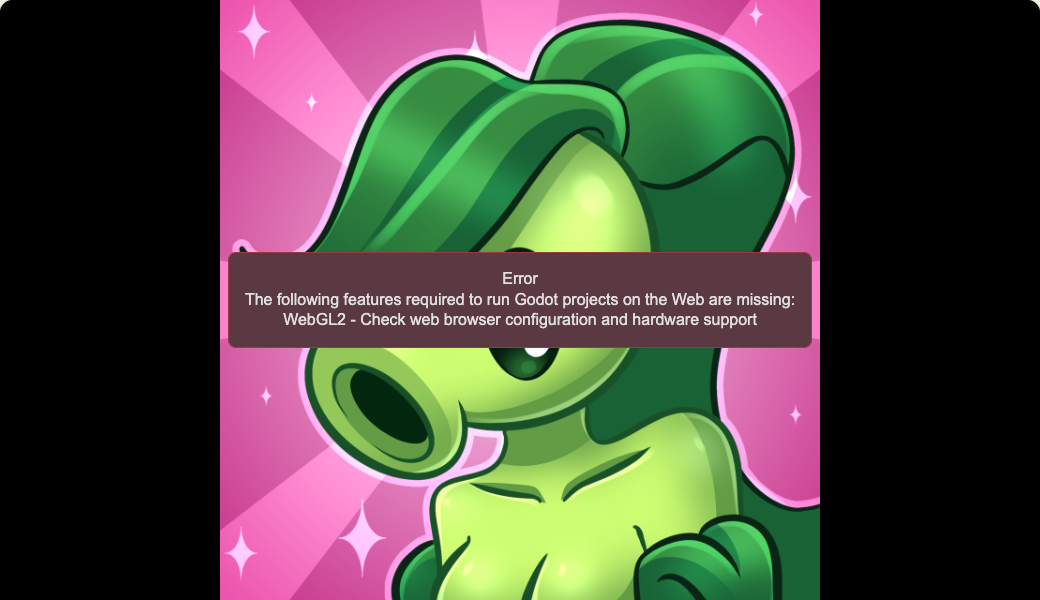
A black screen alone has several possible causes. If you can hear the game, leave fullscreen once and check the regular player for a message. If it stays blank, try another browser on the same connection. Note whether you reached the game title in either browser.
The level lights up, or the lawn stops moving
On a fresh save, open Change Seeds, select Peashooter and use Save Seeds. Select the lit Day 1 tile, then select it again to enter the lawn. A highlighted tile or an empty seed tray can look like a freeze. The Day 1 walkthrough shows the sequence.
If you are already on the lawn, check the pause control first. If the game has stopped responding, close other busy tabs before reloading. Reloading may restart the current wave. Clearing site data can also remove local progress.
Report what you saw
Send the device, browser and last visible screen to the site operator. Say whether the website itself opened and include any error text. For an installed copy, use the Android APK instructions or Windows launch instructions, which cover different files from the browser player.